游戏中除了代码就是资源. 代码本身也是一种资源(Unity3D中代码和资源都被组织在Asset目录下). Unity3D属于All in One, Flash有强大的Flash CS编辑资源, 而XNA也有Content Pipeline, 集成在XNA Game Studio中, 通过属性面板的方式, 设置各个参数. 如下图所示: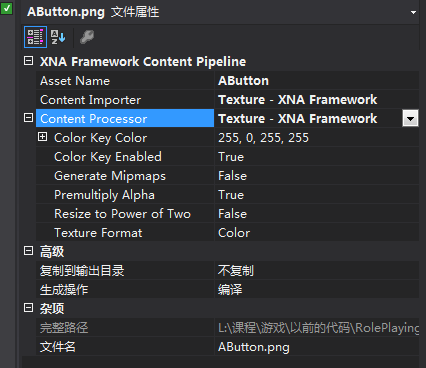
其中Mipmaps和Resize to Power of two在Unity3D中对Sprite进行设置时也有
使用Content Pipeline的好处是什么?官方介绍如下: https://msdn.microsoft.com/en-us/library/bb447756.aspx
The chief reason XNA Game Studio uses a Content Pipeline is to help your game run fast. Without the content pipeline, your game would have to be built with its art assets in their original file format. When the game needs to load its art to draw it on the screen, it would have to determine its format and convert the data into a form it can use more directly. This would have to be performed at run time, for each asset, making the player wait to have fun.
The Content Pipeline remedies this by shifting this time-consuming work to when the game is built. At build time, each asset is imported from its original file format and processed into a managed code object. Those objects are then serialized to a file that is included in the game’s executable.
At run time, the game can then read the serialized data from the file directly into a managed code object for immediate use.
从分工上:
The Content Pipeline is designed to help you include such art assets in your game easily and automatically. An artist working on a a car model can add the resulting file to the XNA Game Studio Express game project, assign the model a name, and choose an importer and content processor for it. Then, a developer who wants to make the car drive can load it by name using a call to ContentManager.Load. This simple flow lets the artist focus on creating assets and the developer focus on using them, without either having to spend time worrying about content transformation.实际上程序员还是要花不少时间在处理资源上, 尤其是重新排列资源的组织方式
下图是Content Pipeline处理过程(https://msdn.microsoft.com/en-us/library/bb447745.aspx)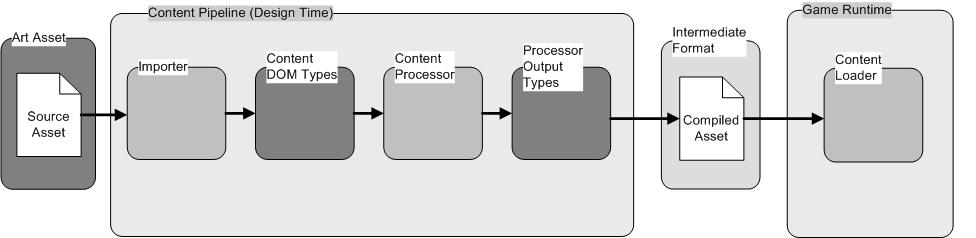
其中Importer和Content Processor属于Design-Time Components, Content Loader属于Runtime Components.
Importer将资源导入到XNA Game Studio中, 以Texture为例, 它的作用是对各类图像格式去差异化, 生成一个统一的Texture对象, 供Processor去处理.
Processor对Importer生成的资源对象进行处理, 以Texture为例, 生成Mipmap等等
Design-Time是指在属性面板中选择合适的Content Importer和Content Processor, 然后build, 生成xnb二进制文件.该文件可以在运行时被加载. 资源源文件不需要和游戏一起发布.Runtime是指游戏运行时. 上图中的Intermediate Format是指.xnb文件.
上图还缺少两个东西: 序列化和反序列化. 前者用于将Content Processor输出的内容序列化成xnb二进制文件, 后者将xnb文件反序列化成相应的对象. 序列化器属于Design-Time, 反序列化器属于RunTime, 体现在代码上就是二者所属的命名空间不同, 前者是namespace Microsoft.Xna.Framework.Content.Pipeline, 后者是namespace Microsoft.Xna.Framework
更详细的过程如下图所示:https://msdn.microsoft.com/zh-cn/library/bb447745(v=xnagamestudio.10)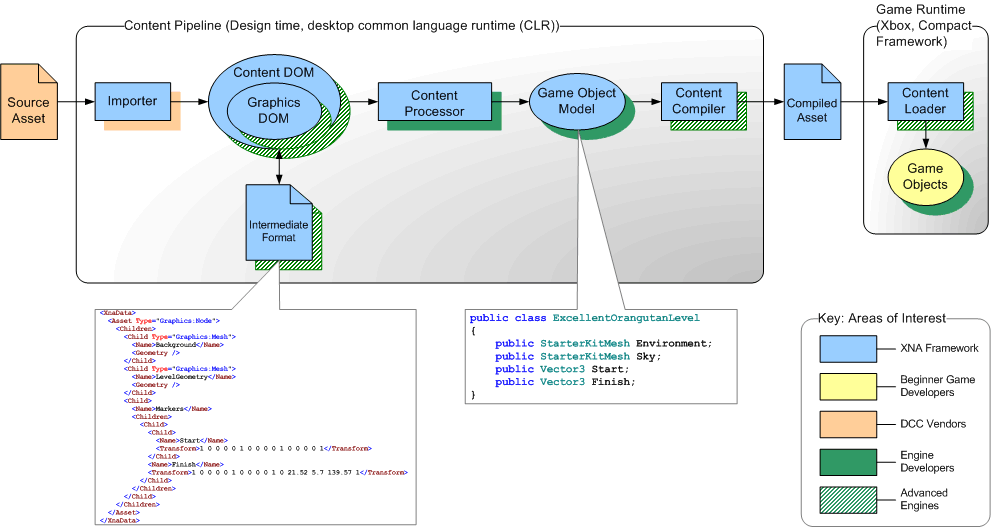
Content Pipeline还可以进行自定义和扩展, 以支持新的资源格式, 或者对原有的Content Processor进行增强. 关于自定义和扩展, 官方的一个概略性介绍如下:
- XNA Game Studio Express supplies standard importers and processors for a number of popular DCC file formats (see Standard Importers and Processors).
- Third parties also create custom importers and processors for XNA Game Studio Express to support additional formats.
- If you have enough information about a DCC file format, you can write your own custom importer and processor for it using classes provided by the Content Pipeline class library (see Writing a Custom Importer).
- When you include an art asset file in your XNA Game Studio Express game project, you use its Properties sheet to specify the importer and processor that is appropriate to it. Thereafter, when you press F5 to build your game, the proper importer and processor for each asset is automatically invoked, and the asset is built into your game in a form that can be loaded at run time on Windows or the Xbox 360 by using ContentManager.Load. ContentManager.Load会寻找合适的ContentTypeReader, 将xnb文件反序列化成对象, 例如Texture2D, SpriteFont等
进一步的自定义和扩展介绍, 见后面的笔记.
以最常用的Texture2D为例, 看看各个组成部分到底是什么样子.
Importer
Importer加载各种图像原文件, 生成一个统一的TextureContent供Processor使用.
不同的图像格式, 有些是RGBA, 有些是BGRA等等, 去差异化1
2
3
4
5
6
7
8
9
10
11
12
13
14
15
16
17
18
19
20
21
22
23
24
25
26
27
28
29
30
31
32
33
34
35
36
37
38
39
40
41
42
43
44
45
46
47
48
49
50
51
52
53
54
55
56
57
58
59
60
61
62
63
64
65
66
67
68
69
70
71
72
73
74
75
76
77
78
79
80
81
82
83
84
85
86
87
88
89
90
91
92
93
94
95
96
97
98
99
100
101
102
103
104
105
106
107
108
109
110
111
112
113
114
115
116
117
118
119
120
121
122
123
124
125
126
127
128
129
130
131
132
133
134
135
136
137
138
139
140
141
142
143
144
145
146
147
148
149
150
151
152
153
154
155
156
157
158
159
160
161
162
163
164
165
166
167
168
169
170
171
172
173
174
175
176
177
178
179
180
181
182
183
184// MonoGame - Copyright (C) The MonoGame Team
// This file is subject to the terms and conditions defined in
// file 'LICENSE.txt', which is part of this source code package.
using System.Runtime.InteropServices;
using Microsoft.Xna.Framework.Graphics;
using Microsoft.Xna.Framework.Content.Pipeline.Graphics;
using Microsoft.Xna.Framework.Graphics.PackedVector;
using FreeImageAPI;
using System.IO;
namespace Microsoft.Xna.Framework.Content.Pipeline
{
/// <summary>
/// Provides methods for reading texture files for use in the Content Pipeline.
/// Texture支持大部分常用的图片格式
/// </summary>
[
]
public class TextureImporter : ContentImporter<TextureContent>
{
/// <summary>
/// Initializes a new instance of TextureImporter.
/// </summary>
public TextureImporter( )
{
}
/// <summary>
/// Called by the XNA Framework when importing a texture file to be used as a game asset. This is the method called by the XNA Framework when an asset is to be imported into an object that can be recognized by the Content Pipeline.该方法是被XNA Framework调用的. FreeImage是一个第三方图像库
/// </summary>
/// <param name="filename">Name of a game asset file.</param>
/// <param name="context">Contains information for importing a game asset, such as a logger interface.</param>
/// <returns>Resulting game asset.</returns>
public override TextureContent Import(string filename, ContentImporterContext context)
{
// Special case for loading DDS
if (filename.ToLower().EndsWith(".dds"))
return DdsLoader.Import(filename, context);
var output = new Texture2DContent { Identity = new ContentIdentity(filename) };
FREE_IMAGE_FORMAT format = FREE_IMAGE_FORMAT.FIF_UNKNOWN;
var fBitmap = FreeImage.LoadEx(filename, FREE_IMAGE_LOAD_FLAGS.DEFAULT, ref format);
//if freeimage can not recognize the image type
if(format == FREE_IMAGE_FORMAT.FIF_UNKNOWN)
throw new ContentLoadException("TextureImporter failed to load '" + filename + "'");
//if freeimage can recognize the file headers but can't read its contents
else if(fBitmap.IsNull)
throw new InvalidContentException("TextureImporter couldn't understand the contents of '" + filename + "'", output.Identity);
BitmapContent face = null;
var height = (int) FreeImage.GetHeight(fBitmap);
var width = (int) FreeImage.GetWidth(fBitmap);
//uint bpp = FreeImage.GetBPP(fBitmap);
var imageType = FreeImage.GetImageType(fBitmap);
// Swizzle channels and expand to include an alpha channel
fBitmap = ConvertAndSwapChannels(fBitmap, imageType);
// The bits per pixel and image type may have changed
uint bpp = FreeImage.GetBPP(fBitmap);
imageType = FreeImage.GetImageType(fBitmap);
var pitch = (int) FreeImage.GetPitch(fBitmap);
var redMask = FreeImage.GetRedMask(fBitmap);
var greenMask = FreeImage.GetGreenMask(fBitmap);
var blueMask = FreeImage.GetBlueMask(fBitmap);
// Create the byte array for the data
byte[] bytes = new byte[((width * height * bpp - 1) / 8) + 1];
//Converts the pixel data to bytes, do not try to use this call to switch the color channels because that only works for 16bpp bitmaps
FreeImage.ConvertToRawBits(bytes, fBitmap, pitch, bpp, redMask, greenMask, blueMask, true);
// Create the Pixel bitmap content depending on the image type
switch(imageType)
{
//case FREE_IMAGE_TYPE.FIT_BITMAP:
default:
face = new PixelBitmapContent<Color>(width, height);
break;
case FREE_IMAGE_TYPE.FIT_RGBA16:
face = new PixelBitmapContent<Rgba64>(width, height);
break;
case FREE_IMAGE_TYPE.FIT_RGBAF:
face = new PixelBitmapContent<Vector4>(width, height);
break;
}
FreeImage.UnloadEx(ref fBitmap);
face.SetPixelData(bytes);
output.Faces[0].Add(face);
return output;
}
/// <summary>
/// Expands images to have an alpha channel and swaps red and blue channels
/// </summary>
/// <param name="fBitmap">Image to process</param>
/// <param name="imageType">Type of the image for the procedure</param>
/// <returns></returns>
private static FIBITMAP ConvertAndSwapChannels(FIBITMAP fBitmap, FREE_IMAGE_TYPE imageType)
{
FIBITMAP bgra;
switch(imageType)
{
// RGBF are switched before adding an alpha channel.
case FREE_IMAGE_TYPE.FIT_RGBF:
// Swap R and B channels to make it BGR, then add an alpha channel
SwitchRedAndBlueChannels(fBitmap);
bgra = FreeImage.ConvertToType(fBitmap, FREE_IMAGE_TYPE.FIT_RGBAF, true);
FreeImage.UnloadEx(ref fBitmap);
fBitmap = bgra;
break;
case FREE_IMAGE_TYPE.FIT_RGB16:
// Swap R and B channels to make it BGR, then add an alpha channel
SwitchRedAndBlueChannels(fBitmap);
bgra = FreeImage.ConvertToType(fBitmap, FREE_IMAGE_TYPE.FIT_RGBA16, true);
FreeImage.UnloadEx(ref fBitmap);
fBitmap = bgra;
break;
case FREE_IMAGE_TYPE.FIT_RGBAF:
case FREE_IMAGE_TYPE.FIT_RGBA16:
//Don't switch channels in this case or colors will be shown wrong
break;
default:
// Bitmap and other formats are converted to 32-bit by default
bgra = FreeImage.ConvertTo32Bits(fBitmap);
SwitchRedAndBlueChannels(bgra);
FreeImage.UnloadEx(ref fBitmap);
fBitmap = bgra;
break;
}
return fBitmap;
}
/// <summary>
/// Switches the red and blue channels
/// </summary>
/// <param name="fBitmap">image</param>
private static void SwitchRedAndBlueChannels(FIBITMAP fBitmap)
{
var r = FreeImage.GetChannel(fBitmap, FREE_IMAGE_COLOR_CHANNEL.FICC_RED);
var b = FreeImage.GetChannel(fBitmap, FREE_IMAGE_COLOR_CHANNEL.FICC_BLUE);
FreeImage.SetChannel(fBitmap, b, FREE_IMAGE_COLOR_CHANNEL.FICC_RED);
FreeImage.SetChannel(fBitmap, r, FREE_IMAGE_COLOR_CHANNEL.FICC_BLUE);
FreeImage.UnloadEx(ref r);
FreeImage.UnloadEx(ref b);
}
}
}
TextureProcessor
Processor中的Public属性会显示在属性面板上1
2
3
4
5
6
7
8
9
10
11
12
13
14
15
16
17
18
19
20
21
22
23
24
25
26
27
28
29
30
31
32
33
34
35
36
37
38
39
40
41
42
43
44
45
46
47
48
49
50
51
52
53
54
55
56
57
58
59
60
61
62
63
64
65
66
67
68
69
70
71
72
73
74
75
76
77
78
79
80
81
82
83
84
85
86
87
88
89
90
91
92
93
94
95
96
97
98
99
100
101
102
103
104
105
106
107
108
109
110
111
112
113
114
115
116
117
118
119
120
121// MonoGame - Copyright (C) The MonoGame Team
// This file is subject to the terms and conditions defined in
// file 'LICENSE.txt', which is part of this source code package.
using System;
using System.ComponentModel;
using Microsoft.Xna.Framework.Content.Pipeline.Graphics;
using Microsoft.Xna.Framework.Graphics;
namespace Microsoft.Xna.Framework.Content.Pipeline.Processors
{
[]
public class TextureProcessor : ContentProcessor<TextureContent, TextureContent>
{
public TextureProcessor()
{
ColorKeyColor = new Color(255, 0, 255, 255);
ColorKeyEnabled = true;
PremultiplyAlpha = true;
}
[]
public virtual Color ColorKeyColor { get; set; }
[]
public virtual bool ColorKeyEnabled { get; set; }
public virtual bool GenerateMipmaps { get; set; }
[]
public virtual bool PremultiplyAlpha { get; set; }
public virtual bool ResizeToPowerOfTwo { get; set; }
public virtual bool MakeSquare { get; set; }
public virtual TextureProcessorOutputFormat TextureFormat { get; set; }
public override TextureContent Process(TextureContent input, ContentProcessorContext context)
{
SurfaceFormat format;
if (input.Faces[0][0].TryGetFormat(out format))
{
// If it is already a compressed format, we cannot do anything else so just return it
if (format.IsCompressedFormat())
return input;
}
if (ColorKeyEnabled || ResizeToPowerOfTwo || MakeSquare || PremultiplyAlpha)
{
// Convert to floating point format for modifications. Keep the original format for conversion back later on if required.
var originalType = input.Faces[0][0].GetType();
try
{
input.ConvertBitmapType(typeof(PixelBitmapContent<Vector4>));
}
catch (Exception ex)
{
context.Logger.LogImportantMessage("Could not convert input texture for processing. " + ex.ToString());
throw ex;
}
for (int f = 0; f < input.Faces.Count; ++f)
{
var face = input.Faces[f];
for (int m = 0; m < face.Count; ++m)
{
var bmp = (PixelBitmapContent<Vector4>)face[m];
if (ColorKeyEnabled)
{
bmp.ReplaceColor(ColorKeyColor.ToVector4(), Vector4.Zero);
}
if (ResizeToPowerOfTwo)
{
if (!GraphicsUtil.IsPowerOfTwo(bmp.Width) || !GraphicsUtil.IsPowerOfTwo(bmp.Height) || (MakeSquare && bmp.Height != bmp.Width))
{
var newWidth = GraphicsUtil.GetNextPowerOfTwo(bmp.Width);
var newHeight = GraphicsUtil.GetNextPowerOfTwo(bmp.Height);
if (MakeSquare)
newWidth = newHeight = Math.Max(newWidth, newHeight);
var resized = new PixelBitmapContent<Vector4>(newWidth, newHeight);
BitmapContent.Copy(bmp, resized);
bmp = resized;
}
}
else if (MakeSquare && bmp.Height != bmp.Width)
{
var newSize = Math.Max(bmp.Width, bmp.Height);
var resized = new PixelBitmapContent<Vector4>(newSize, newSize);
BitmapContent.Copy(bmp, resized);
}
if (PremultiplyAlpha)
{
for (int y = 0; y < bmp.Height; ++y)
{
var row = bmp.GetRow(y);
for (int x = 0; x < bmp.Width; ++x)
row[x] = Color.FromNonPremultiplied(row[x]).ToVector4();
}
}
face[m] = bmp;
}
}
// If no change to the surface format was desired, change it back now before it early outs
if (TextureFormat == TextureProcessorOutputFormat.NoChange)
input.ConvertBitmapType(originalType);
}
// Get the texture profile for the platform and let it convert the texture.
var texProfile = TextureProfile.ForPlatform(context.TargetPlatform);
texProfile.ConvertTexture(context, input, TextureFormat, GenerateMipmaps, false);
return input;
}
}
}
序列化
注意它所属的命名空间. Serialization下面除了Compiler, 还有一个Serializer, 二者之间的差异见后面的笔记1
2
3
4
5
6
7
8
9
10
11
12
13
14
15
16
17
18
19
20
21
22
23
24
25
26
27
28
29
30
31
32
33
34
35
36// MonoGame - Copyright (C) The MonoGame Team
// This file is subject to the terms and conditions defined in
// file 'LICENSE.txt', which is part of this source code package.
using System;
using Microsoft.Xna.Framework.Content.Pipeline.Graphics;
using Microsoft.Xna.Framework.Graphics;
namespace Microsoft.Xna.Framework.Content.Pipeline.Serialization.Compiler
{
[]
class Texture2DWriter : BuiltInContentWriter<Texture2DContent>
{
protected internal override void Write(ContentWriter output, Texture2DContent value)
{
var mipmaps = value.Faces[0]; // Mipmap chain.
var level0 = mipmaps[0]; // Most detailed mipmap level.
SurfaceFormat format;
if (!level0.TryGetFormat(out format))
throw new Exception("Couldn't get Format for TextureContent.");
output.Write((int)format);
output.Write(level0.Width);
output.Write(level0.Height);
output.Write(mipmaps.Count); // Number of mipmap levels.
foreach (var level in mipmaps)
{
var pixelData = level.GetPixelData();
output.Write(pixelData.Length);
output.Write(pixelData);
}
}
}
}
反序列化
注意该类的位置是在framework中, 不在content pipeline中,
因为该类是运行时用到的1
2
3
4
5
6
7
8
9
10
11
12
13
14
15
16
17
18
19
20
21
22
23
24
25
26
27
28
29
30
31
32
33
34
35
36
37
38
39
40
41
42
43
44
45
46
47
48
49
50
51
52
53
54
55
56
57
58
59
60
61
62
63
64
65
66
67
68
69
70
71
72
73
74
75
76
77
78
79
80
81
82
83
84
85
86
87
88
89
90
91
92
93
94
95
96
97
98
99
100
101
102
103
104
105
106
107
108
109
110
111
112
113
114
115
116
117
118
119
120
121
122
123
124
125
126
127
128
129
130
131
132
133
134
135
136
137
138
139
140
141
142
143
144
145
146
147
148
149
150
151
152
153
154
155
156
157
158
159
160
161
162
163
164
165
166
167
168
169
170// MonoGame - Copyright (C) The MonoGame Team
// This file is subject to the terms and conditions defined in
// file 'LICENSE.txt', which is part of this source code package.
using System;
using Microsoft.Xna;
using Microsoft.Xna.Framework;
using Microsoft.Xna.Framework.Content;
using Microsoft.Xna.Framework.Graphics;
namespace Microsoft.Xna.Framework.Content
{
internal class Texture2DReader : ContentTypeReader<Texture2D>
{
internal Texture2DReader()
{
// Do nothing
}
protected internal override Texture2D Read(ContentReader reader, Texture2D existingInstance)
{
Texture2D texture = null;
var surfaceFormat = (SurfaceFormat)reader.ReadInt32();
int width = reader.ReadInt32();
int height = reader.ReadInt32();
int levelCount = reader.ReadInt32();
int levelCountOutput = levelCount;
// If the system does not fully support Power of Two textures,
// skip any mip maps supplied with any non PoT textures.
if (levelCount > 1 && !reader.GraphicsDevice.GraphicsCapabilities.SupportsNonPowerOfTwo &&
(!MathHelper.IsPowerOfTwo(width) || !MathHelper.IsPowerOfTwo(height)))
{
levelCountOutput = 1;
System.Diagnostics.Debug.WriteLine(
"Device does not support non Power of Two textures. Skipping mipmaps.");
}
SurfaceFormat convertedFormat = surfaceFormat;
switch (surfaceFormat)
{
case SurfaceFormat.Dxt1:
case SurfaceFormat.Dxt1a:
if (!reader.GraphicsDevice.GraphicsCapabilities.SupportsDxt1)
convertedFormat = SurfaceFormat.Color;
break;
case SurfaceFormat.Dxt1SRgb:
if (!reader.GraphicsDevice.GraphicsCapabilities.SupportsDxt1)
convertedFormat = SurfaceFormat.ColorSRgb;
break;
case SurfaceFormat.Dxt3:
case SurfaceFormat.Dxt5:
if (!reader.GraphicsDevice.GraphicsCapabilities.SupportsS3tc)
convertedFormat = SurfaceFormat.Color;
break;
case SurfaceFormat.Dxt3SRgb:
case SurfaceFormat.Dxt5SRgb:
if (!reader.GraphicsDevice.GraphicsCapabilities.SupportsS3tc)
convertedFormat = SurfaceFormat.ColorSRgb;
break;
case SurfaceFormat.NormalizedByte4:
convertedFormat = SurfaceFormat.Color;
break;
}
texture = existingInstance ?? new Texture2D(reader.GraphicsDevice, width, height, levelCountOutput > 1, convertedFormat);
Threading.BlockOnUIThread(() =>
{
for (int level = 0; level < levelCount; level++)
{
var levelDataSizeInBytes = reader.ReadInt32();
var levelData = reader.ContentManager.GetScratchBuffer(levelDataSizeInBytes);
reader.Read(levelData, 0, levelDataSizeInBytes);
int levelWidth = width >> level;
int levelHeight = height >> level;
if (level >= levelCountOutput)
continue;
//Convert the image data if required
switch (surfaceFormat)
{
case SurfaceFormat.Dxt1:
case SurfaceFormat.Dxt1SRgb:
case SurfaceFormat.Dxt1a:
if (!reader.GraphicsDevice.GraphicsCapabilities.SupportsDxt1 && convertedFormat == SurfaceFormat.Color)
levelData = DxtUtil.DecompressDxt1(levelData, levelWidth, levelHeight);
break;
case SurfaceFormat.Dxt3:
case SurfaceFormat.Dxt3SRgb:
if (!reader.GraphicsDevice.GraphicsCapabilities.SupportsS3tc)
if (!reader.GraphicsDevice.GraphicsCapabilities.SupportsS3tc && convertedFormat == SurfaceFormat.Color)
levelData = DxtUtil.DecompressDxt3(levelData, levelWidth, levelHeight);
break;
case SurfaceFormat.Dxt5:
case SurfaceFormat.Dxt5SRgb:
if (!reader.GraphicsDevice.GraphicsCapabilities.SupportsS3tc)
if (!reader.GraphicsDevice.GraphicsCapabilities.SupportsS3tc && convertedFormat == SurfaceFormat.Color)
levelData = DxtUtil.DecompressDxt5(levelData, levelWidth, levelHeight);
break;
case SurfaceFormat.Bgra5551:
{
// Shift the channels to suit OpenGL
int offset = 0;
for (int y = 0; y < levelHeight; y++)
{
for (int x = 0; x < levelWidth; x++)
{
ushort pixel = BitConverter.ToUInt16(levelData, offset);
pixel = (ushort)(((pixel & 0x7FFF) << 1) | ((pixel & 0x8000) >> 15));
levelData[offset] = (byte)(pixel);
levelData[offset + 1] = (byte)(pixel >> 8);
offset += 2;
}
}
}
break;
case SurfaceFormat.Bgra4444:
{
// Shift the channels to suit OpenGL
int offset = 0;
for (int y = 0; y < levelHeight; y++)
{
for (int x = 0; x < levelWidth; x++)
{
ushort pixel = BitConverter.ToUInt16(levelData, offset);
pixel = (ushort)(((pixel & 0x0FFF) << 4) | ((pixel & 0xF000) >> 12));
levelData[offset] = (byte)(pixel);
levelData[offset + 1] = (byte)(pixel >> 8);
offset += 2;
}
}
}
break;
case SurfaceFormat.NormalizedByte4:
{
int bytesPerPixel = surfaceFormat.GetSize();
int pitch = levelWidth * bytesPerPixel;
for (int y = 0; y < levelHeight; y++)
{
for (int x = 0; x < levelWidth; x++)
{
int color = BitConverter.ToInt32(levelData, y * pitch + x * bytesPerPixel);
levelData[y * pitch + x * 4] = (byte)(((color >> 16) & 0xff)); //R:=W
levelData[y * pitch + x * 4 + 1] = (byte)(((color >> 8) & 0xff)); //G:=V
levelData[y * pitch + x * 4 + 2] = (byte)(((color) & 0xff)); //B:=U
levelData[y * pitch + x * 4 + 3] = (byte)(((color >> 24) & 0xff)); //A:=Q
}
}
}
break;
}
texture.SetData(level, null, levelData, 0, levelDataSizeInBytes);
}
});
return texture;
}
}
}
TextureContent
XNA Game Studio Content Document Object Model (DOM) 这个统一各个图像格式的TextureContent是什么样子, 里面的Faces用于mipmap1
2
3
4
5
6
7
8
9
10
11
12
13
14
15
16
17
18
19
20
21
22
23
24
25
26
27
28
29
30
31
32
33
34
35
36
37
38
39
40
41
42
43
44
45
46
47
48
49
50
51
52
53
54
55
56
57
58
59
60
61
62
63
64
65
66
67
68
69
70
71
72
73
74
75
76
77
78
79
80
81
82
83
84
85
86
87
88
89
90
91
92
93
94
95
96
97
98
99
100
101
102
103
104
105
106
107
108
109
110
111
112
113
114// MonoGame - Copyright (C) The MonoGame Team
// This file is subject to the terms and conditions defined in
// file 'LICENSE.txt', which is part of this source code package.
using System;
using System.Linq;
using Microsoft.Xna.Framework.Graphics;
namespace Microsoft.Xna.Framework.Content.Pipeline.Graphics
{
/// <summary>
/// Provides a base class for all texture objects.
/// </summary>
public abstract class TextureContent : ContentItem
{
MipmapChainCollection faces;
/// <summary>
/// Collection of image faces that hold a single mipmap chain for a regular 2D texture, six chains for a cube map, or an arbitrary number for volume and array textures.
/// </summary>
public MipmapChainCollection Faces
{
get
{
return faces;
}
}
/// <summary>
/// Initializes a new instance of TextureContent with the specified face collection.
/// </summary>
/// <param name="faces">Mipmap chain containing the face collection.</param>
protected TextureContent(MipmapChainCollection faces)
{
this.faces = faces;
}
/// <summary>
/// Converts all bitmaps for this texture to a different format.
/// </summary>
/// <param name="newBitmapType">Type being converted to. The new type must be a subclass of BitmapContent, such as PixelBitmapContent or DxtBitmapContent.</param>
public void ConvertBitmapType(Type newBitmapType)
{
if (newBitmapType == null)
throw new ArgumentNullException("newBitmapType");
if (!newBitmapType.IsSubclassOf(typeof (BitmapContent)))
throw new ArgumentException(string.Format("Type '{0}' is not a subclass of BitmapContent.", newBitmapType));
if (newBitmapType.IsAbstract)
throw new ArgumentException(string.Format("Type '{0}' is abstract and cannot be allocated.", newBitmapType));
if (newBitmapType.ContainsGenericParameters)
throw new ArgumentException(string.Format("Type '{0}' contains generic parameters and cannot be allocated.", newBitmapType));
if (newBitmapType.GetConstructor(new Type[2] {typeof (int), typeof (int)}) == null)
throw new ArgumentException(string.Format("Type '{0} does not have a constructor with signature (int, int) and cannot be allocated.",
newBitmapType));
foreach (var mipChain in faces)
{
for (var i = 0; i < mipChain.Count; i++)
{
var src = mipChain[i];
if (src.GetType() != newBitmapType)
{
var dst = (BitmapContent)Activator.CreateInstance(newBitmapType, new object[] { src.Width,src.Height });
BitmapContent.Copy(src, dst);
mipChain[i] = dst;
}
}
}
}
/// <summary>
/// Generates a full set of mipmaps for the texture.
/// </summary>
/// <param name="overwriteExistingMipmaps">true if the existing mipmap set is replaced with the new set; false otherwise.</param>
public virtual void GenerateMipmaps(bool overwriteExistingMipmaps)
{
// If we already have mipmaps and we're not supposed to overwrite
// them then return without any generation.
if (!overwriteExistingMipmaps && faces.Any(f => f.Count > 1))
return;
// Generate the mips for each face.
foreach (var face in faces)
{
// Remove any existing mipmaps.
var faceBitmap = face[0];
face.Clear();
face.Add(faceBitmap);
var faceType = faceBitmap.GetType();
int width = faceBitmap.Width;
int height = faceBitmap.Height;
while (width > 1 && height > 1)
{
width /= 2;
height /= 2;
var mip = (BitmapContent)Activator.CreateInstance(faceType, new object[] { width, height });
BitmapContent.Copy(faceBitmap, mip);
face.Add(mip);
}
}
}
/// <summary>
/// Verifies that all contents of this texture are present, correct and match the capabilities of the device.
/// </summary>
/// <param name="targetProfile">The profile identifier that defines the capabilities of the device.</param>
public abstract void Validate(GraphicsProfile? targetProfile);
}
}